

This is the simplest and easiest way to add a Recent Posts/Recent Articles widget in your blog. Unlike other blogs, the tutorial here uses the standard Blogger Feed widget to make the Recent Posts/Recent Articles widget. And I am 100% sure your Recent Posts/Recent Articles widget will work.
 Step by step tutorial on how to put Recent Posts widget in Blogger
1. Login to your Blogger account.
2. Click on Layout.
3. Click on Add a Gadget.
4. Choose Feed.

5. Paste your Feed URL.
Example feed URLs are:
http://feedproxy.google.com/bloggertinker
http://bloggertinker.blogspot.com/feeds/posts/default
If you don't know where to get the feed URL of your blog, the easiest way to do that is to locate the text Subscribe to: Posts (Atom), just located after every post on your blog.
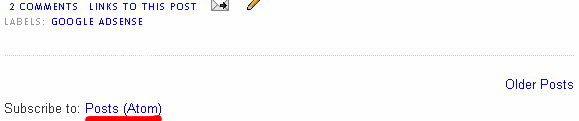 If you are using firefox, write click on the Posts (Atom) link and then click Copy Link Location.
If you are using Internet Explorer, write click on the Posts (Atom) link and then click Copy Shortcut.
6. Click on CONTINUE.
7. This page displays a preview of your Recent Posts Widget. The default title of your widget is the name of your blog, just change it to "Recent Posts" or whatever title you like. You can change the number of recent posts/recent articles/items to be shown. You also have the option to display the item dates (dates of your recent posts), and item sources/authors (author/s of your recent posts).
 8. Click on SAVE.
9. View your blog and I am 100% sure your Recent Posts/Recent Articles widget will show up!
If you are wondering why I did not use a Recent Post widget on my blog, please take a look of my Archive-Popular-Categories-Traffic tabbed navigation widget on my sidebar (right side). As you can see my default display for the widget is my blog Archive, if I am going to put a Recent Posts widget then it will be redundant (for me). But it is really up to you if you want to put this widget.
Other related post from the net:
http://beautifulbeta.blogspot.com/2006/11/customizable-recent-posts-widget.html
http://themelib.com/2008/07/recent-posts-and-recent-comments-widgets-for-blogger/
http://www.eblogtemplates.com/setup-recent-posts-recent-comments/
http://www.bloggerbuster.com/2008/07/recent-posts-widget-for-blogger.html


 Subscribe to my RSS Feed


